Match
Visa, salary and location filters on a live board. Sponsorship shows on the card, before you spend anything.
Sponsor roles every day
Product
A free job board. Apply for free. A plan is only if you want the resume rewritten, autofill, or the tracker.
The Loop · Four Marks
Visa, salary and location filters on a live board. Sponsorship shows on the card, before you spend anything.
Match, rewrite and quality check in one pass, powered by Claude. A tone slider — Formal, Balanced or Natural — keeps every line sounding like you.
Apply Assist fills the ATS form from your profile. You read it, you change it, you send it.
Every apply lands in Application Tracker with its status, your notes and the resume that went out.
Sponsorship clarity
If work authorization decides which roles are worth your time, Hyriva puts sponsorship signals on the job card — not buried after you’ve rewritten a resume for a citizen-only posting.

Sponsorship sits right next to level, salary, and your fit score — you see it while you’re deciding, not after you’ve tailored a resume. Generic resume tools ignore it entirely, even though it decides everything for people on H-1B, OPT, and similar paths.
Full-time first
The Jobs feed is overwhelmingly W-2 / Full-time roles — the same ones you’d hunt by hand, without the 1099 noise.
of live roles in Jobs are direct Full-time
If you’re looking for a full-time job, you shouldn’t wade through contractor spam to find it. Hyriva’s live pool is built for that hunt — sponsorship clarity on top, Full-time underneath.
Resume intelligence
Upload once. We read your resume the way a hiring screen does — clarity, proof, and what’s missing — so you fix the weak spots before they cost you a callback.
Humanized per-job tailoring · Powered by Claude
We start from the resume you already uploaded. Applying with that file is free. A rewrite takes a plan and one credit. Weekly adds Chrome autofill, and you still hit send.
Monthly+ operating system
On Monthly and Quarterly, every apply from Jobs lands in Application Tracker so you can run the hunt from one board — on the web and in the app.
Chrome Apply Assist
Autofill matched fields from your Application Profile — and learn answers as you type so the next form is faster. You still hit Submit.
Interview Preparation
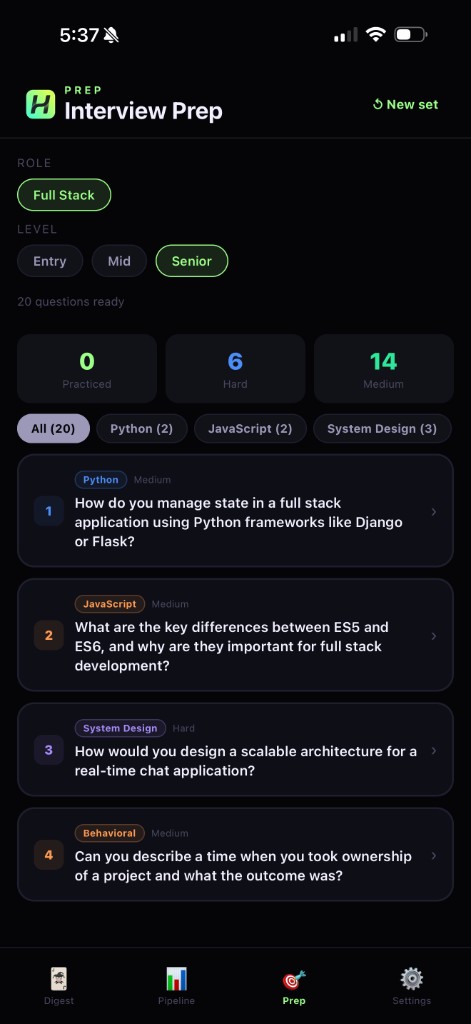
Monthly+ unlocks Interview Preparation tied to your target role, level, and the company you’re walking into.
Feature reference
One place for the detail. The sections above are the story; this grid is the checklist.
Daily roles by titles, location, salary, experience, and sponsorship — overwhelmingly Full-time, with a fit reason on each card.
Filter and widen with clearer signals when legal status changes which postings are worth opening.
JD match, summary, bullets, and a quality check — powered by Claude. Then a job-specific draft. You approve every change.
Paste or upload any resume, add a job description from anywhere — LinkedIn, a careers page, email — and get a tailored resume for that posting.
Reads your file, extracts skills and experience, scores quality, and names the gap most likely to cost callbacks.
What already lands vs what’s missing — metrics, years, outcomes — before you tailor for a live role.
Every line: original vs improved. Use the rewrite, keep yours, or edit.
Autofill Extension fills matched fields from your profile. Weekly and above. You review and submit.
Generate for the role when you need one — 1 credit per generation.
Applied, skipped, needs action, interview — the board for a real hunt.
Role, level, and company-tied questions with answers, tips, and practiced tracking.
Spend a credit when you start tailoring for a job; that job’s PDF is included. No token meters.
Day Pass: Classic. Weekly: Classic, Modern, Minimal. Monthly+: all layouts — Technical, Executive, Creative, Academic, Entry-Level, Professional, and more.
Same login for preferences, Jobs and credits on web, iPhone and Android.